
Security Email Pro
Advaanced Email Security for Windows
Protect your email with modern security tools designed to reduce tracking,
detect threats, improve privacy, and give you greater control over every message.
Secure Email with More Control
Security Email Pro brings powerful email security, privacy, and productivity tools together in one Windows desktop app.
Protect your messages with advanced encryption, block tracking pixels, identify suspicious links and attachments, and reduce unwanted email tracking.
Compose and manage email with tools designed to make everyday communication safer, more private, and easier to control.

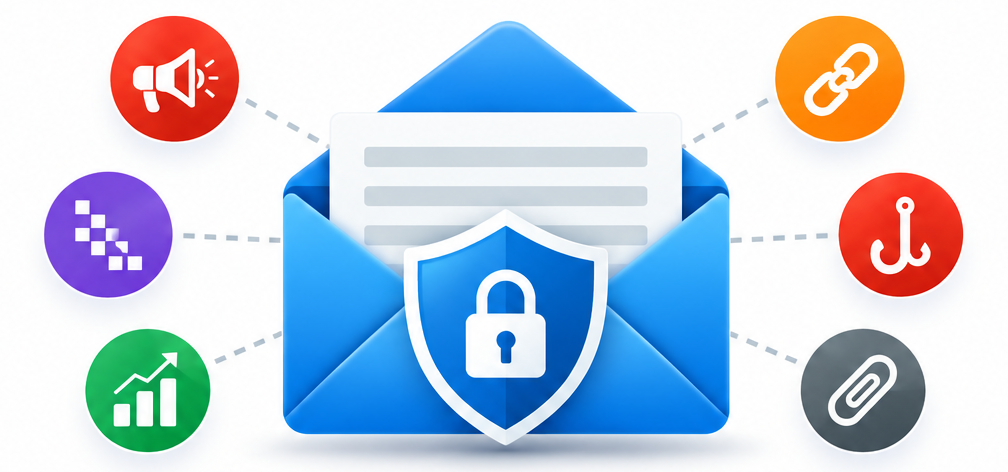
What’s hiding in your email?
Email can contain much more than the message you see. Behind the scenes, messages and links may include:
- Ad servers
- Tracking pixels
- Marketing analytics
- Suspicious or misleading links
- Phishing attempts
- Potentially dangerous attachments
Take Back Your Privacy
Tracking pixels and other technologies can report when you open an email and may help advertisers and marketers track your activity.
Security Email Pro helps detect and control these hidden elements, giving you more information about what is inside your email before you interact with it.
It also helps reduce unnecessary tracking from the messages you receive and the messages you send.
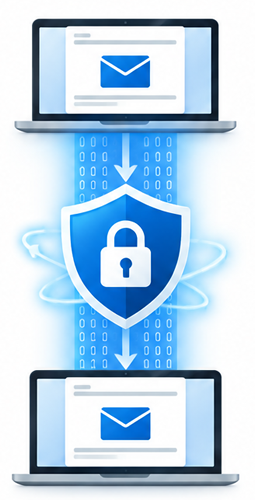
End-to-End Encryption
Protect Your Messages from Sender to Recipient
Security Email Pro provides end-to-end encryption designed to keep the contents of your messages protected throughout their journey.
Your messages are encrypted on the sender's computer and decrypted by the intended recipient, helping prevent email providers, network operators, hackers, and other third parties from reading the protected content.
Advanced Encryption Protection
Security Email Pro uses quantum-resistant encryption technology, keeps encryption keys under your control, and combines encryption with digital signatures to help protect both the privacy and authenticity of your messages.
This approach can also help protect sensitive information if email systems or servers are compromised.

Quantum-Resistant Encryption
Designed for the Next Generation of Security
Security Email Pro uses lattice-based, post-quantum cryptography designed to protect encrypted information against threats from both traditional computing attacks and future quantum-computing threats.
Your encryption keys remain under your control. They are created and stored locally on your PC rather than being generated or stored by an outside cloud service.
Your Keys Stay With You
Encryption keys are themselves protected with encryption, adding another layer of security to your private information.
Security Email Pro combines modern cryptography with local key control to provide long-term protection for sensitive email communications.
Compose With Ai Assistance
Use Your Preferred AI Assistant
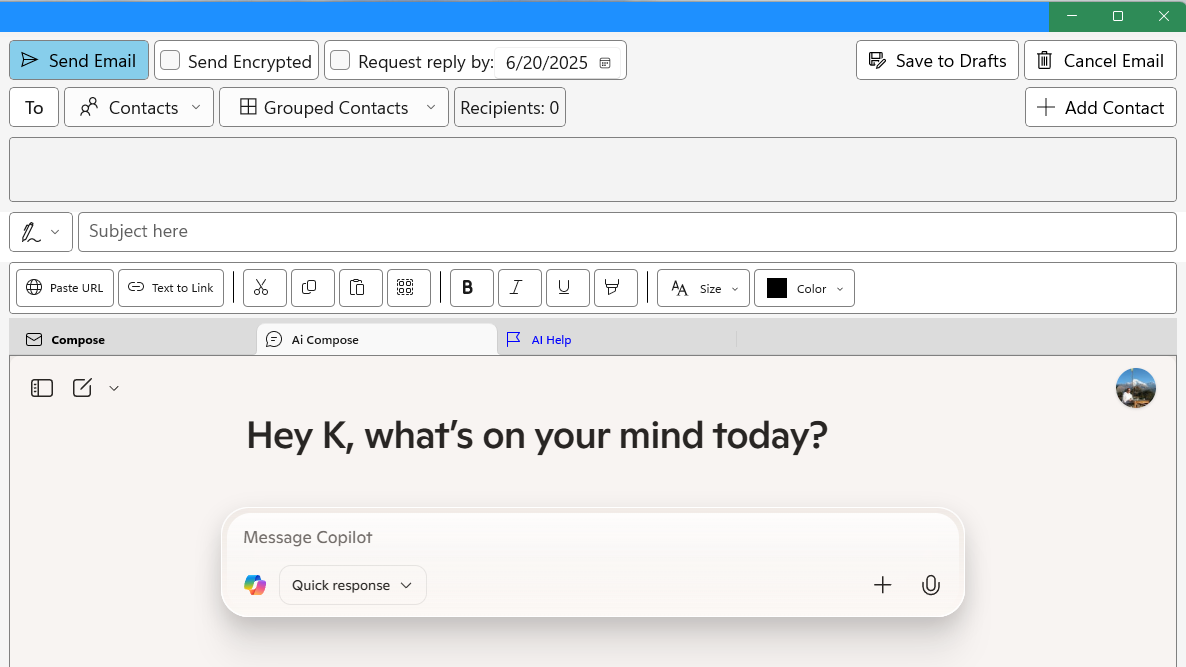
Security Email Pro makes it easy to use your preferred AI assistant while composing an email.
Ask AI to help draft a new message, improve wording, organize your thoughts, or refine a response—all while working from the email composition screen.
You Choose the AI
Use the AI service you prefer while keeping you in control of the final message.
Labels
Organize Email Your Way
Labels give you a flexible way to organize messages without moving them from their existing folders.
Apply labels to related emails, then select a label to quickly view messages associated with it.
Use labels for projects, people, topics, priorities, or any other grouping that makes your email easier to find and manage.
Snippets
Write Repetitive Emails Faster
Snippets let you save frequently used text and insert it into an email whenever you need it.
Create reusable text snippets, signatures, placeholders, and pre-composed subject lines for information you use again and again.
Instead of retyping common content, select what you need and add it to your message—saving time while keeping your emails consistent.
Phish Check Email with AI
Get a Second Opinion Before You Trust an Email
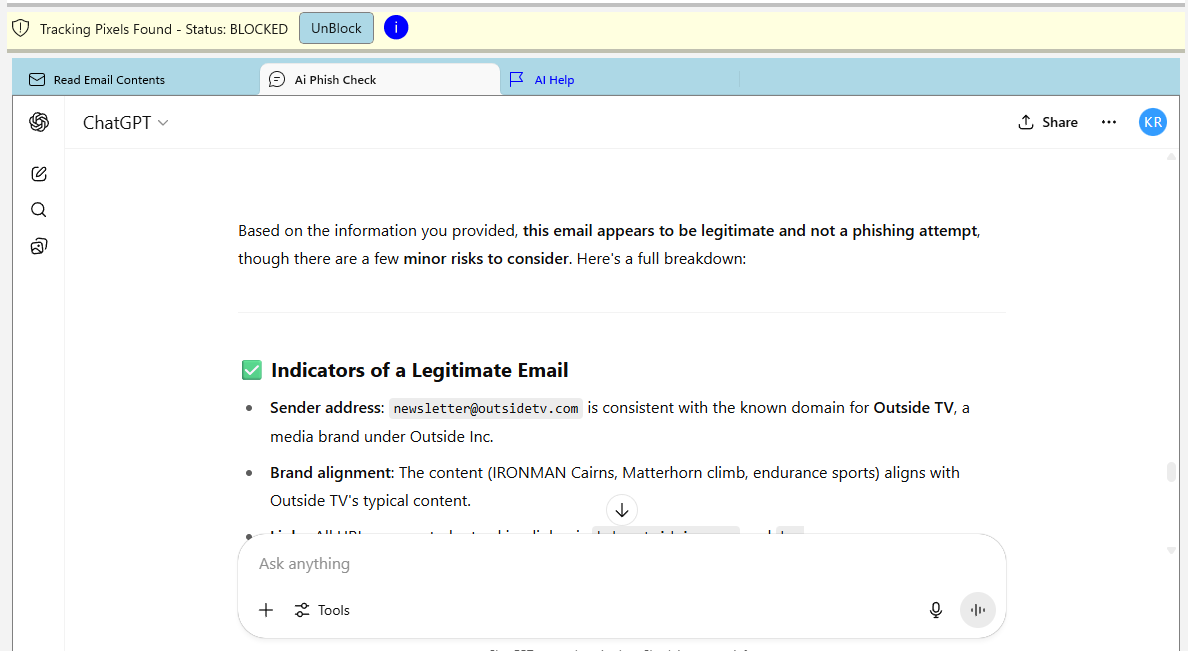
Security Email Pro can send key information from a suspicious message to your preferred AI assistant for additional analysis.
The AI can evaluate details such as the sender address, subject, attachment extensions, links, and message content to help identify signs of phishing or other suspicious activity.
You Make the Final Decision
AI analysis provides another layer of information to help you evaluate an email—it does not replace your own judgment or Security Email Pro's built-in security checks.
Ad Server Blocking
Reduce Unwanted Advertising and Tracking
Ad servers are used to deliver advertising and can collect information about user activity, interests, and ad interactions.
Email and web content may make connections to these servers behind the scenes, allowing information to be exchanged without being obvious to the user.
Blocked by Security Email Pro
Security Email Pro checks connections against a database of known ad servers and can block unwanted requests before they are allowed to load.
Blocking these connections helps reduce advertising-related tracking and limits the information that outside advertising services can collect about your activity.
Tracking Pixel Blocking
Stop Hidden Email Tracking
Tracking pixels are tiny, often invisible images embedded in HTML email. When they load, they can notify the sender that you opened the message and may reveal information about when and where it was opened.
This allows marketers and other senders to collect information about your email activity without requiring you to click anything.
Blocked by Security Email Pro
Security Email Pro detects tracking pixels in HTML email and can prevent them from loading.
Blocking these hidden trackers helps protect information about your email-reading activity and improves your privacy when opening messages.
Phishing Protection
Recognize Suspicious Emails Before You Act
Phishing emails are designed to look legitimate while attempting to trick you into revealing sensitive information, opening a dangerous attachment, or following a fraudulent link.
These messages may imitate trusted companies, create a false sense of urgency, or use convincing language to encourage you to act before thinking.
Security Email Pro Alerts You
Security Email Pro examines email subjects and message content for common signs and language associated with phishing attempts.
When something suspicious is detected, the app alerts you and gives you an opportunity to stop and examine the message before taking action.
For additional analysis, you can also use the app's AI Phish Check feature to get a second opinion about a questionable email.

Link Tracking Protection
Remove Hidden Tracking from Links
Links in emails and websites can contain tracking information within their URL parameters. These parameters may be used to measure marketing campaigns and associate clicks with particular messages, users, or sources.
Much of this information is invisible during normal browsing, even though it may be passed to the destination website when you click the link.
Cleaned by Security Email Pro
Security Email Pro examines links you click or paste into an email and removes recognized tracking parameters when they are not needed for the destination.
The cleaned link still takes you to the intended website while reducing the unnecessary tracking information passed along with your visit.
Suspicious Attachment Protection
Think Before You Open
Email attachments can contain malicious files, ransomware, or other threats. A convincing message can make a dangerous attachment appear perfectly legitimate.
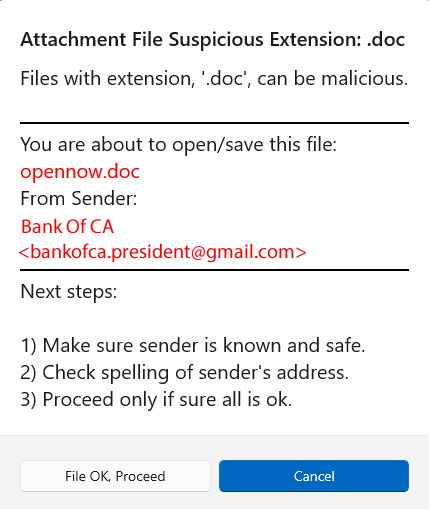
Security Email Pro examines attachment file types and warns you when an attachment has an extension associated with increased risk.
Security Email Pro Alerts You
Before the file is opened or saved, the app displays a warning with information about the attachment and its sender.
That extra pause gives you an opportunity to verify the sender, examine the filename, and decide whether you really want to proceed.

Private Browser
Browse Links with Greater Privacy
Security Email Pro includes a private browser for opening links without leaving the email application.
The browser is designed to reduce common forms of web tracking and limit the persistent browsing data normally left behind during everyday web use.
Privacy Built Into the App
Open links directly in Security Email Pro without automatically sending them to your regular browser.
Combined with the app's link-cleaning and tracking protection features, the private browser provides a more privacy-focused way to visit links contained in your email.
Link Cleaning
Cleaner, Safer Links Before You Visit
Links can contain much more than the web address you actually need. Tracking parameters, promotional identifiers, hidden characters, and other additions may be embedded in a URL.
Security Email Pro examines links and removes recognized unnecessary elements while preserving the address needed to reach the intended destination.
More Than Tracking Removal
Link Cleaning can identify or remove several types of unwanted link content, including marketing and analytics parameters, promotional trackers, hidden or misleading characters, and other recognized tracking elements.
The app can also alert you to suspicious links, giving you another opportunity to examine a destination before opening it.
Advanced Compose Tools
More Control Over Every Message
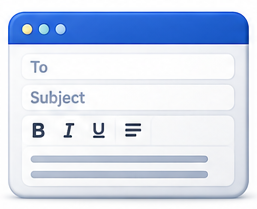
Security Email Pro includes additional compose tools that go beyond the basics of writing and sending an email.
Set a Reply By date when a response is important, use saved snippets for subjects and frequently used text, and send messages efficiently to predefined contact groups.
Paste web links directly into your message while taking advantage of Security Email Pro's link-cleaning features.
Compose Your Way
Use the built-in editor for everyday messages or bring in your preferred AI assistant when you want help drafting, rewriting, or refining your email.
Tasks and Calendar
Keep Important Dates Close to Your Email
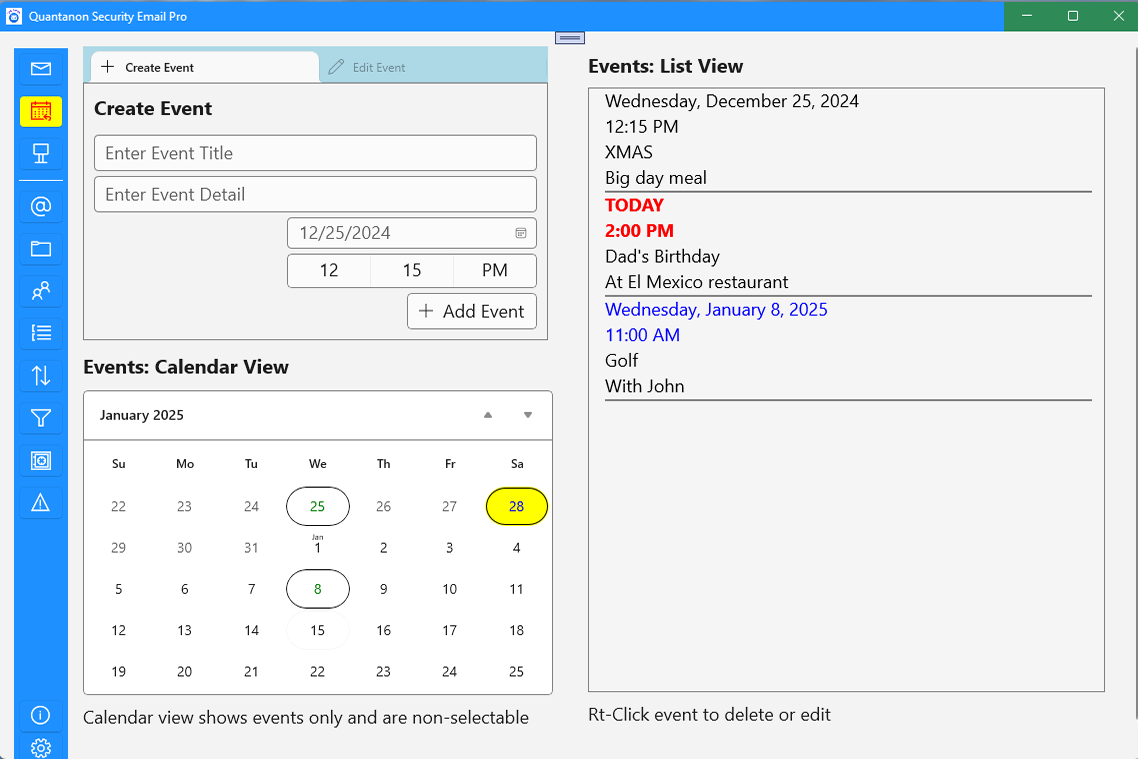
Security Email Pro includes built-in task and calendar tools for keeping track of important dates, reminders, and upcoming activities.
Create events directly in the app and view them in either a calendar or list format, making it easy to see what is coming up.
Private and Local
Your calendar information stays within Security Email Pro and does not require a connection to an outside cloud calendar service.
This gives you a simple way to manage email-related dates and tasks without automatically sharing that information with another online service.
Contact Groups
Organize Contacts for Faster Emailing
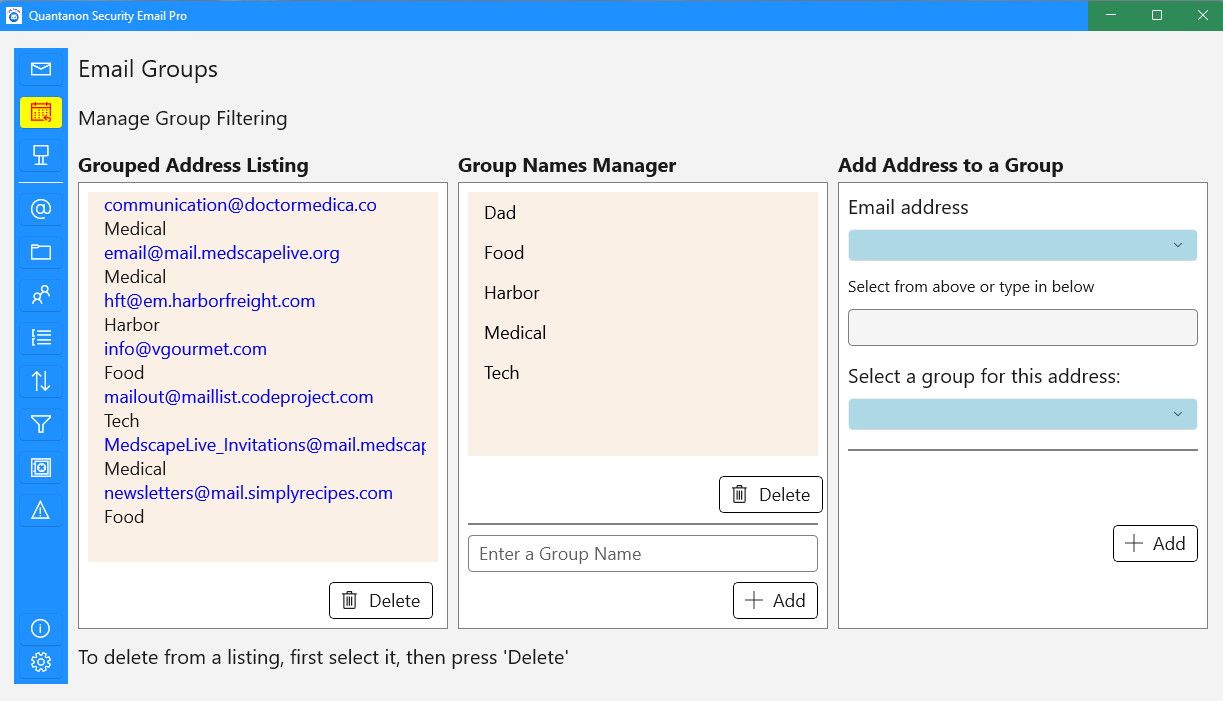
Create your own contact groups and add email addresses to the categories that make sense to you.
Use groups for family, friends, work, projects, organizations, or any other collection of people you email regularly.
Find and Email Groups Easily
Group assignments make it easier to organize and filter addresses within Security Email Pro.
When composing a message, you can select a predefined group instead of adding each recipient individually—making group email faster and easier to manage.
Use Existing Provider
Keep your existing email accounts and continue using providers such as Outlook and Gmail.
Safer Attachments
Get warnings for suspicious attachments before opening or saving potentially dangerous files.
Smart Email Tools
Analyze message headers, automatically organize incoming mail, and simplify everyday email management.
Get Security Email Pro
Available for Windows Desktop
No Ads · No In-App Purchases · No Paid Upgrades